Look and feel
The user interface can be customised using the HTML section of the configuration. Some parts of the interface cannot be customised, such as the 'Powered by DataWollet' logo.
HTML code is injected from this configuration without any further sanitisation as it is expected to be from a trusted source. Do not use inputs from untrusted sources, or there will be a risk of cross-site scripting.
Main interface
It is possible to leave some of the configurable zones blank. The default stylesheet will hide many of the sections if they are empty.
| Configuration | Description |
|---|---|
header | Content of the user interface that is always shown, regardless of whether it is collapsed or expanded. Pressing on the header causes the rest of the interface to expand. |
instructions | Shown immediately below the header once expanded, if no sources have been added, or below the list of sources otherwise. Normally used to provide instructions to the user. |
dropzoneStart | Shown below the instructions and inside the area that accepts drag and drop inputs. Normally used to show error messages relating to the source. |
dropzoneEnd | Shown inside the area that accepts drag and drop inputs but below the file selection button. |
footnotes | Shown below the drag and drop area. |
footer | Shown at the end of the expanded section of the interface below all other content, including below the DataWollet logo. |
Example without documents added
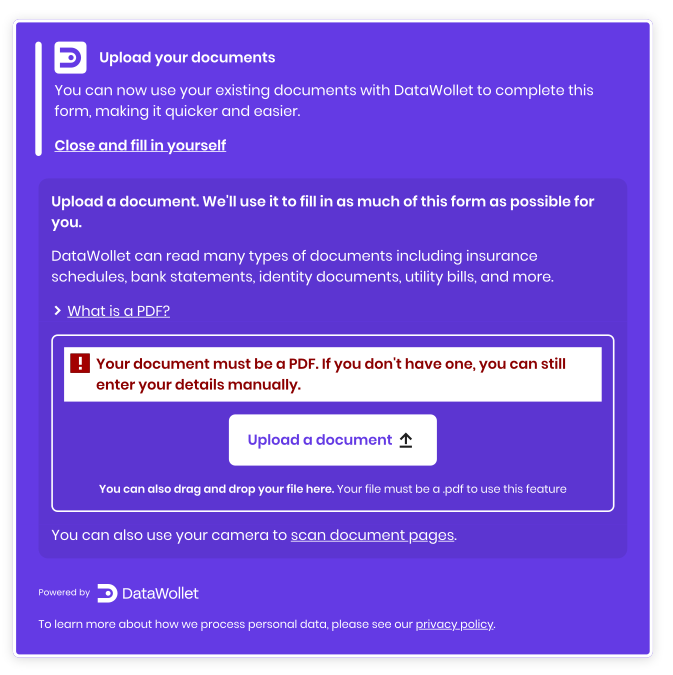
header
<span class="dw-visible-when--sources--none custom--header-title">Upload your documents</span>
<p class="dw-visible-when--sources--none custom--header-secondary">You can now use your existing documents with DataWollet to complete this form, making it quicker and easier.</p>

<div class="dw-visible-when--expanded">
  <div class="dw-visible-when--sources--none">
    <button class="dw-controller-inline-content-button" id="custom--collapse-link-close" data-dw-action="collapse">
      Close and fill in yourself
    </button>
  </div>
</div>

<div class="dw-visible-when--collapsed">
  <div class="dw-visible-when--sources--none">
    <button class="dw-controller-block-content-button custom--button--ai" data-dw-action="expand">
      Get started
    </button>
  </div>
</div>

<span class="dw-visible-when--sources--some custom--header-title">
  <span>
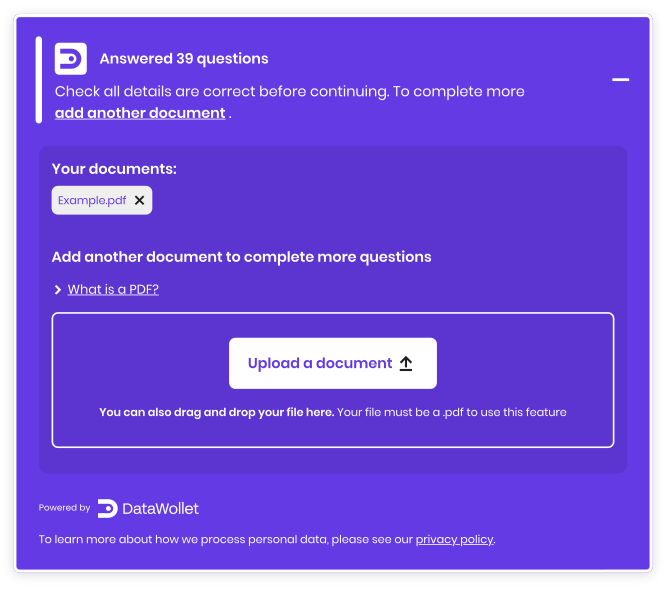
    Answered <span data-dw-data="fill.expected">...</span> question<span class="dw-visible-when--fills--not--one">s</span>
  </span>
</span>
<p class="dw-visible-when--sources--some custom--header-secondary">
  Check all details are correct before continuing. To complete more <button class="dw-controller-inline-content-button" data-dw-action="expand">
    add another document
  </button>
  .
</p>
instructions
<div class="custom--instructions dw-visible-when--custom--desktop">
  <p class="dw-visible-when--sources--none">Upload a document. We'll use it to fill in as much of this form as possible for you.</p>
  <p class="dw-visible-when--sources--none">DataWollet can read many types of documents including insurance schedules, bank statements, identity documents, utility bills, and more.</p>

  <div class="custom--hint-box">
    <p>We couldn't answer many questions with that document. Try adding another.</p>
  </div>

  <p class="dw-visible-when--sources--some custom--emphasis">Add another document to complete more questions</p>
</div>

<div class="custom--instructions dw-visible-when--custom--mobile">
  <!-- Shorter version for mobile -->
</div>

<button class="dw-detail-toggle custom--detail-summary" type="button" aria-expanded="false" aria-controls="custom--find-documents">
  What is a PDF?
</button>
<div id="custom--find-documents" class="custom--detail-expanded">
  <p>A PDF is an electronic document format. DataWollet can use both high-quality scanned documents and digital PDFs.</p>
</div>
dropzoneStart
<div class="dw-visible-when--error">
  <p class="dw-visible-when--error--file-type">
    Your document must be a PDF. If you don't have one, you can still enter your details manually.
  </p>
  <p class="dw-visible-when--error--file-parse">
    Sorry, we couldn’t read that file. Please try a different file or enter details manually.
  </p>
  <p class="dw-visible-when--error--file-size">
    Sorry, that file's too large to upload. Please select a file under 4.5MB or enter details manually.
  </p>
  <p class="dw-visible-when--error--source-unexpected">
    Sorry, we don't recognise that document. Please check it's the right file and try again. If this doesn't work, you can still complete the details manually.
  </p>
  <p class="dw-visible-when--error--source-expectations">
    Sorry, we don’t support this file yet, but we will soon. For now, you can try another file or return to complete the details manually.
  </p>
  <p class="dw-visible-when--error--source-unmatched">
    Sorry, we don't recognise that document. Please check it's the right file and try again. If this doesn't work, you can still complete the details manually.
  </p>
  <p class="dw-visible-when--error--source-lacking">
    Sorry, we don’t support this file yet, but we will soon. For now, you can try another file or return to complete the details manually.
  </p>
  <p class="dw-visible-when--error--server-error">
    Sorry, something’s gone wrong. Please try again or continue to complete the details manually.
  </p>
  <p class="dw-visible-when--error--server-timeout">
    Document upload timed out, please try again.
  </p>
  <p class="dw-visible-when--error--server-forbidden">
    Sorry, we couldn’t upload your document. Please try again or return to complete the details manually.
  </p>
  <p class="dw-visible-when--error--scan-permission">
    Permission to use the camera to scan was declined. Try uploading a PDF instead.
  </p>
  <p class="dw-visible-when--error--scan-quality">
    That scan seems to be low quality. Try uploading a PDF instead.
  </p>
</div>
dropzoneEnd
<div class="dw-visible-when--error">
  <p class="dw-visible-when--error--scan-capability">Camera scanning isn't available on this device. Try uploading a PDF instead.</p>
</div>
<p class="dw-visible-when--custom--desktop">
  <span>You can also drag and drop your file here.</span>
  <span>Your file must be a .pdf to use this feature</span>
</p>
footer
<p>To learn more about how we process personal data, please see our <a href="https://www.datawollet.com/privacy-policy" target="_blank">privacy policy</a>.</p>
Example after document added
Cover
The cover element is used to make it clear to the user that activity is happening, and can either cover just the main interface or cover the whole body.
| Configuration | Description |
|---|---|
cover | A full screen cover by default shown while uploading and pre-filling, though this can be customised and changed using stylesheets. Used to display loading and status messaging to the user. |
Example cover
<div class="custom-cover-messages dw-visible-when--interaction--none">
  <p class="dw-visible-when--activity--uploading">Uploading your document...</p>

  <p class="dw-visible-when--activity--prefilling dw-visible-when--activity--filling dw-visible-when--activity--idle">
    <span data-dw-data="fill.expected">...</span>
    question<span class="dw-visible-when--fills--not--one">s</span>
    answered so far using your document...
  </p>

  <div class="dw-visible-when--activity--uploading dw-visible-when--activity--prefilling custom-cover-spinner"></div>
  <div class="dw-visible-when--activity--idle dw-visible-when--activity--filling custom-cover-tick"></div>
</div>

File drag & drop
A second cover only over the drag & drop zone is used to provide feedback.
| Configuration | Description |
|---|---|
dropzoneDrag | Shown while a file is being dragged over the zone, and used to provide a drop instruction or an error message if the file type will not be accepted. |
Example of the dropzone on drag
<p class="dw-visible-when--drop--permitted">
  Drop the file here
</p>
<p class="dw-visible-when--drop--invalid">
  Your document must be a PDF. If you don't have one, you can still enter details manually.
</p>

Confirmations
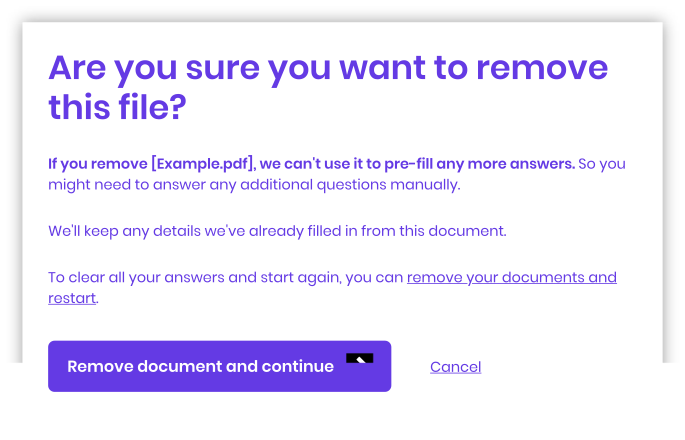
Actions such as removing a document can be configured to require confirmation. The confirmation dialogs appear inside of the cover to prevent other parts of the interface being manipulated at the same time. The data-dw-action attribute should be used to trigger a reset, confirm, or cancel action.
| Configuration | Description |
|---|---|
confirmation | Only visible when a user interaction is required, such as confirming the removal of a source. Used to provide details of what the user is being asked to confirm and why. |
Example of a confirmation modal
<div class="custom--confirm-message">
  <h2 class="custom--confirm-message--header">
    Are you sure you want to remove this file?
  </h2>

  <p>
    <span class="custom--instructions--emphasised">
      If you remove [<span data-dw-data="source.manipulating">...</span>],
      we can't use it to pre-fill any more answers.
    </span>
    So you might need to answer any additional questions manually.
  </p>

  <p>We'll keep any details we've already filled in from this document.</p>

  <p>
    To clear all your answers and start again, you can
    <a class="dw-controller-inline-content-button" data-dw-action="reset">
      remove your documents and restart
    </a>.
  </p>
</div>

<div class="custom--confirm-controls">
  <button class="dw-controller-inline-action-button" data-dw-action="confirm">
    Remove document and continue
  </button>
  <button class="dw-controller-inline-content-button" data-dw-action="cancel">
    Cancel
  </button>
</div>
Triggering actions
Buttons, links or other elements included in the HTML sections can be set to perform actions with the library by setting the data-dw-action attribute. Using this attribute will also supress any default behaviour.
data-dw-action | Description |
|---|---|
collapse | Collapse the section of the user interface beneath the header. No effect if already collapsed. |
expand | Expand the collapsible section of the user interface beneath the header. No effect if already expanded. |
toggle | Toggle the visibility section of the user interface beneath the header. |
confirm | Confirm an action that requires confirmation, such as removing a source. |
cancel | Cancel an action that requires confirmation, such as removing a source. |
reset | Remove all sources and terminate the session. This is normally used to reset any changes made. An event handler can be used to perform additional actions such as redirection after the session is terminated. |